Command Reference
1. Session Analysis Commands
ocmonitor session <path>
Analyze a single coding session in detail.
# Analyze a specific session directory
ocmonitor session ~/.local/share/opencode/storage/message/ses_20250118_143022

# With JSON output
ocmonitor session ~/.local/share/opencode/storage/message/ses_20250118_143022 --format json
Example Output:
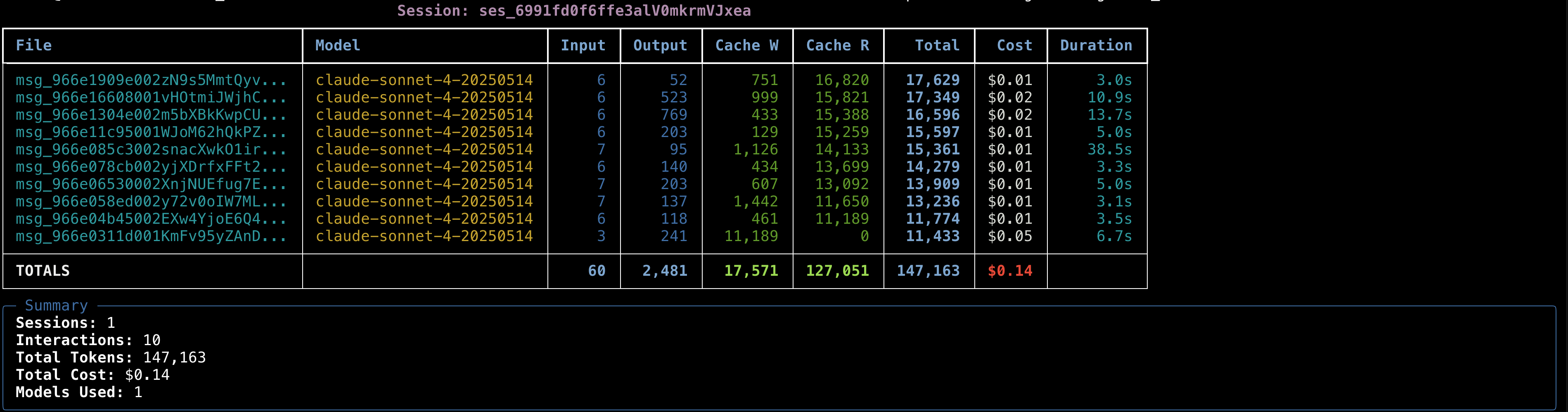
Click image to view full-size screenshot of session analysis output
ocmonitor sessions <path>
Analyze all sessions in a directory with summary statistics.
# Analyze all sessions
ocmonitor sessions ~/.local/share/opencode/storage/message

# Limit to recent sessions
ocmonitor sessions ~/.local/share/opencode/storage/message --limit 10

# JSON format for programmatic use
ocmonitor sessions ~/.local/share/opencode/storage/message --format json
Example Output:
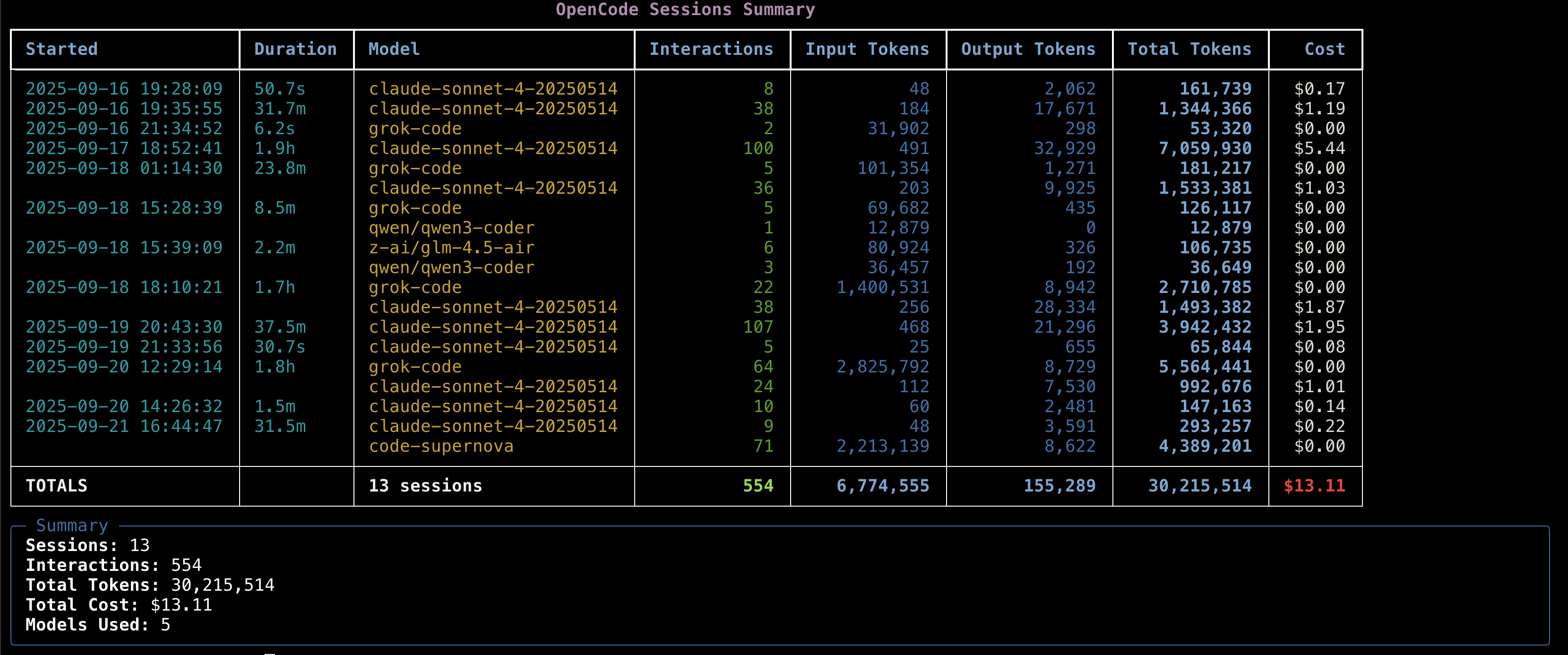
Click image to view full-size screenshot of sessions summary output
2. Time-Based Analysis Commands
ocmonitor daily <path>
Daily usage breakdown with cost and token analysis.
# Daily breakdown
ocmonitor daily ~/.local/share/opencode/storage/message

# With per-model breakdown
ocmonitor daily ~/.local/share/opencode/storage/message --breakdown

# JSON output
ocmonitor daily ~/.local/share/opencode/storage/message --format json
Example Output:

Click image to view full-size screenshot of daily usage breakdown
ocmonitor weekly <path> [--start-day <day>]
Weekly usage patterns and trends with customizable week start days.
# Default (Monday start)
ocmonitor weekly ~/.local/share/opencode/storage/message

# Custom week start days
ocmonitor weekly ~/.local/share/opencode/storage/message --start-day sunday
ocmonitor weekly ~/.local/share/opencode/storage/message --start-day friday

# With per-model breakdown
ocmonitor weekly ~/.local/share/opencode/storage/message --start-day sunday --breakdown

# Specific year with custom week start
ocmonitor weekly ~/.local/share/opencode/storage/message --year 2025 --start-day wednesday
Supported Days: monday, tuesday, wednesday, thursday, friday, saturday, sunday
Features:
- Customize week boundaries to match your calendar preference
- US standard (Sunday), European (Monday), business week (Friday), etc.
- Date range display shows actual week boundaries
- Table title indicates selected week start day
ocmonitor monthly <path>
Monthly usage analysis and cost tracking.
# Monthly breakdown
ocmonitor monthly ~/.local/share/opencode/storage/message

# With per-model breakdown
ocmonitor monthly ~/.local/share/opencode/storage/message --breakdown
3. Model Analysis Commands
ocmonitor models <path>
Detailed breakdown of usage per AI model.
# Model usage statistics
ocmonitor models ~/.local/share/opencode/storage/message

# JSON format
ocmonitor models ~/.local/share/opencode/storage/message --format json
Example Output:

Click image to view full-size screenshot of model usage analytics
ocmonitor projects <path>
Analyze AI usage costs and token consumption by coding project.
# Project usage breakdown
ocmonitor projects ~/.local/share/opencode/storage/message

# Filter by date range
ocmonitor projects ~/.local/share/opencode/storage/message --start-date 2024-01-01 --end-date 2024-01-31

# JSON format for detailed analysis
ocmonitor projects ~/.local/share/opencode/storage/message --format json

# CSV format for spreadsheet analysis
ocmonitor projects ~/.local/share/opencode/storage/message --format csv
Features:
- Project Breakdown - Shows sessions, interactions, tokens, and costs per project
- Summary Statistics - Total projects, sessions, interactions, tokens, and cost
- Activity Tracking - First and last activity dates for each project
- Model Usage - Lists AI models used for each project
- Export Support - Full export capabilities with detailed metadata
Example Output:
                             Project Usage Breakdown
┏━━━━━━━━━━━┳━━━━━━━━━━┳━━━━━━━━━━━━━━┳━━━━━━━━━━━━━━┳━━━━━━━━━┳━━━━━━━━━━━━━━━━━┓
┃ Project   ┃ Sessions ┃ Interactions ┃ Total Tokens ┃    Cost ┃ Models Used     ┃
┡━━━━━━━━━━━╇━━━━━━━━━━╇━━━━━━━━━━━━━━╇━━━━━━━━━━━━━━╇━━━━━━━━━╇━━━━━━━━━━━━━━━━━┩
│ ocmonitor │        5 │           12 │       25,340 │ $0.0512 │ claude-sonnet-… │
│ myapp     │        3 │            8 │       18,200 │ $0.0364 │ claude-opus-4   │
│ website   │        2 │            4 │        8,150 │ $0.0163 │ grok-code       │
└───────────┴──────────┴──────────────┴──────────────┴─────────┴─────────────────┘
╭────────────────────────────────── Summary ───────────────────────────────────╮
│ Total: 3 projects, 10 sessions, 24 interactions, 51,690 tokens, $0.10        │
╰──────────────────────────────────────────────────────────────────────────────╯
4. Live Monitoring Commands
ocmonitor live <path>
Real-time monitoring dashboard that updates automatically.
# Start live monitoring (updates every 5 seconds)
ocmonitor live ~/.local/share/opencode/storage/message

# Custom refresh interval (in seconds)
ocmonitor live ~/.local/share/opencode/storage/message --refresh 10
Features:
- Auto-refreshing display with professional UI redesign
- Real-time cost tracking with progress indicators
- Live session duration with 5-hour progress bar and color-coded time alerts
- Token usage updates and context window monitoring
- Color-coded status indicators (green/orange/yellow/red based on time elapsed)
- Project name display for better context awareness
- Human-readable session titles replacing cryptic session IDs
- Clean, professional styling with optimal space utilization
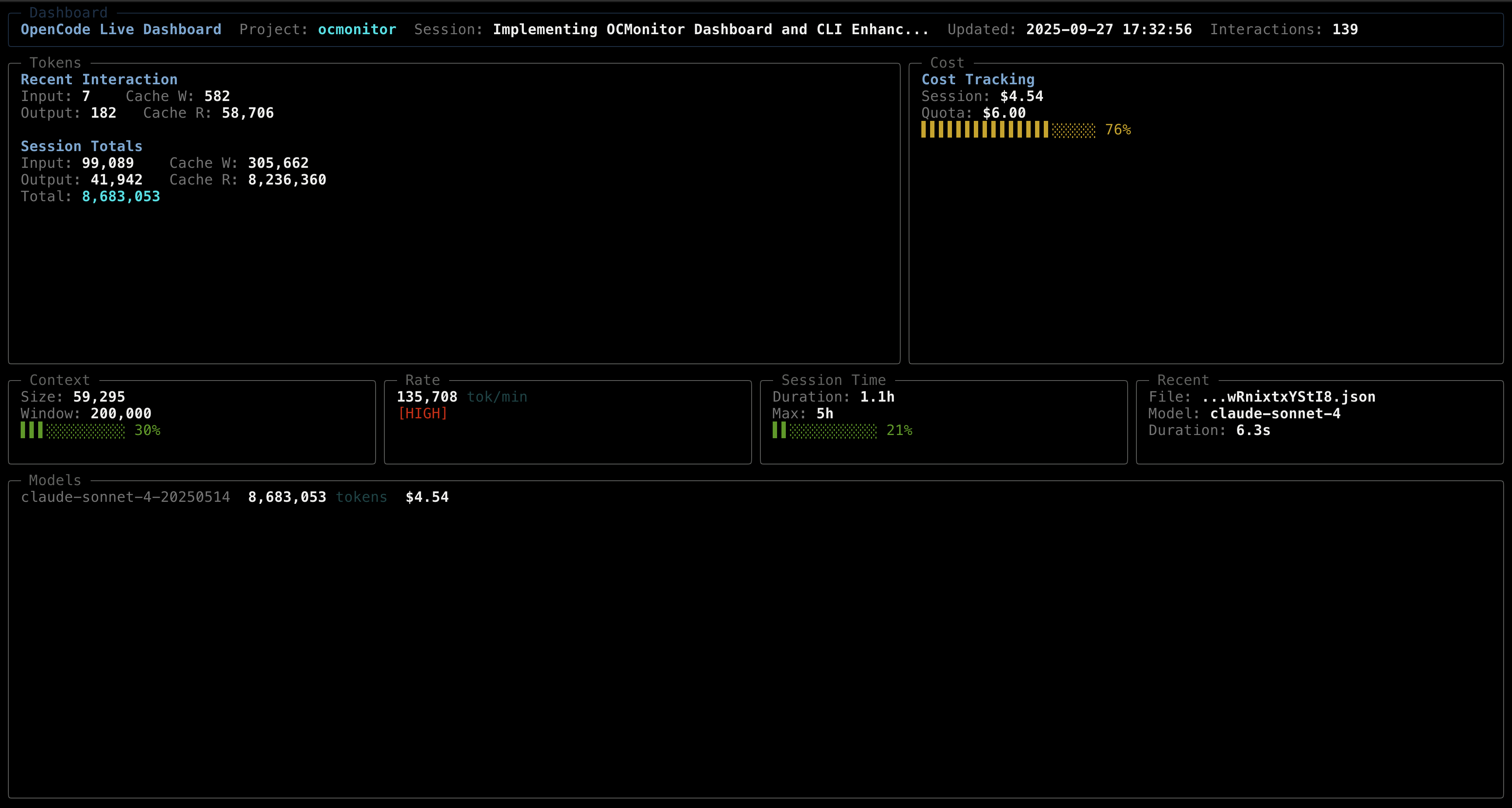
Click image to view full-size screenshot of the live monitoring dashboard
Using the —breakdown Flag
The --breakdown flag adds per-model token consumption and cost details to daily, weekly, and monthly reports.
# Show model breakdown in daily report
ocmonitor daily ~/.local/share/opencode/storage/message --breakdown

# Show model breakdown in weekly report
ocmonitor weekly ~/.local/share/opencode/storage/message --breakdown

# Show model breakdown in monthly report
ocmonitor monthly ~/.local/share/opencode/storage/message --breakdown
Example Output:
                             Daily Usage Breakdown
┏━━━━━━━━━━━━━━━━━━━━━━━━━━━━━━━━┳━━━━━━━━━━┳━━━━━━━━━━━━┳━━━━━━━━━━━┳━━━━━━━━━┓
┃ Date / Model                   ┃ Sessions ┃ Interactions┃ Total Tokens┃    Cost ┃
┡━━━━━━━━━━━━━━━━━━━━━━━━━━━━━━━━╇━━━━━━━━━━╇━━━━━━━━━━━━╇━━━━━━━━━━━╇━━━━━━━━━┩
│ 2024-01-13                     │        1 │          2 │     1,150 │ $0.0128 │
│   ↳ claude-sonnet-4-20250514   │        1 │          2 │     1,150 │ $0.0128 │
│ 2024-01-14                     │        1 │          1 │     5,200 │ $0.0000 │
│   ↳ grok-code                  │        1 │          1 │     5,200 │ $0.0000 │
└────────────────────────────────┴──────────┴────────────┴───────────┴─────────┘
Features:
- Model rows indented and styled distinctly
- Shows sessions, interactions, tokens, and cost per model
- Models sorted by cost (descending)
- Total row shows aggregate values